<!-- TOC 1: What is a simple CRM for service teams? -->
<div class="wm-article">
<div class="aio">
<div class="label">Quick answer</div>
<p><strong>A simple CRM for service teams</strong> tracks leads, customers, and service requests in one visual pipeline, works from a phone in the field, and takes days, not months, to roll out. It skips bloated features so reps actually use it, which keeps follow-ups, renewals, and handoffs from slipping through the cracks.</p>
</div>
<p>A CRM, or customer relationship management system, is software that stores every conversation, quote, and follow-up with a lead or customer in one place. A <em>simple</em> CRM does that job with a short list of fields, a clear pipeline, and an interface people can learn in an afternoon.</p>
<p>The "service team" part matters. Sales-only tools assume a rep sitting at a desk. Service teams are different: drivers, technicians, installers, and account managers meet customers all day, spot upsell opportunities on site, and have no time to type into a laptop. A CRM for service teams has to handle both the <strong>buyer journey</strong> (sales cycle) and the <strong>customer journey</strong> (service cycle), and it has to work on a phone.</p>
</div>
<!-- TOC 2: Why less is more -->
<div class="wm-article">
<p>Most CRM projects do not fail because the software lacks features. They fail because nobody uses it. When every deal needs twenty fields, a consultant to change a stage, and a laptop to log a visit, reps go back to notes apps and memory. The data goes stale, managers stop trusting reports, and the subscription becomes shelfware.</p>
<p>Review sites that rank the best simple CRMs keep coming back to the same point: ease of use and fast onboarding beat raw feature count, and a CRM only works if the team uses it consistently. Simple tools win because adoption is the real ROI.</p>
<h3>Simple CRM vs. legacy CRM at a glance</h3>
<div class="tbl">
<table>
<thead><tr><th>Factor</th><th>Simple CRM</th><th>Legacy / overbuilt CRM</th></tr></thead>
<tbody>
<tr><td>Setup time</td><td>Days, with guided onboarding</td><td>Weeks to months, often with consultants</td></tr>
<tr><td>Learning curve</td><td>Hours</td><td>Training programs and certifications</td></tr>
<tr><td>Mobile use</td><td>Built for the field: photo, voice, one tap</td><td>Desktop-first, mobile as an afterthought</td></tr>
<tr><td>Pipelines</td><td>Sales and service in one place</td><td>Separate modules, extra licences</td></tr>
<tr><td>Hidden costs</td><td>Few: pricing tied to what you use</td><td>Add-ons, integrations, admin headcount</td></tr>
<tr><td>Adoption</td><td>High: reps open it daily</td><td>Low: data entry feels like busywork</td></tr>
</tbody>
</table>
</div>
</div>
<!-- TOC 3: When a spreadsheet stops working -->
<div class="wm-article">
<p>Spreadsheets are cheap, familiar, and flexible, which is why they stick around. For one person with a few contacts, they are fine. The trouble starts at the handoffs: a lead moves from sales to delivery, a renewal comes due, or two people edit different versions of the same file.</p>
<p>It is time to move to a CRM when you notice any of these signs:</p>
<ul>
<li>Follow-ups slip because nothing reminds anyone to make them.</li>
<li>Your sheet has more than a few tabs and several "final" versions.</li>
<li>Field staff cannot add or see account details from their phones.</li>
<li>Managers cannot answer "what is stalled and why?" without asking around.</li>
<li>Quotes and agreements live in email threads and shared drives.</li>
</ul>
<div class="callout"><strong>Rule of thumb:</strong> if more than one person touches a customer record, or you track more than a handful of active opportunities, a shared CRM will save more time than it costs.</div>
</div>
<!-- TOC 4: 7 features to look for -->
<div class="wm-article">
<p>Skip the long feature checklist. These seven cover what service teams use every day.</p>
<h3>1. A pipeline that matches your workflow</h3>
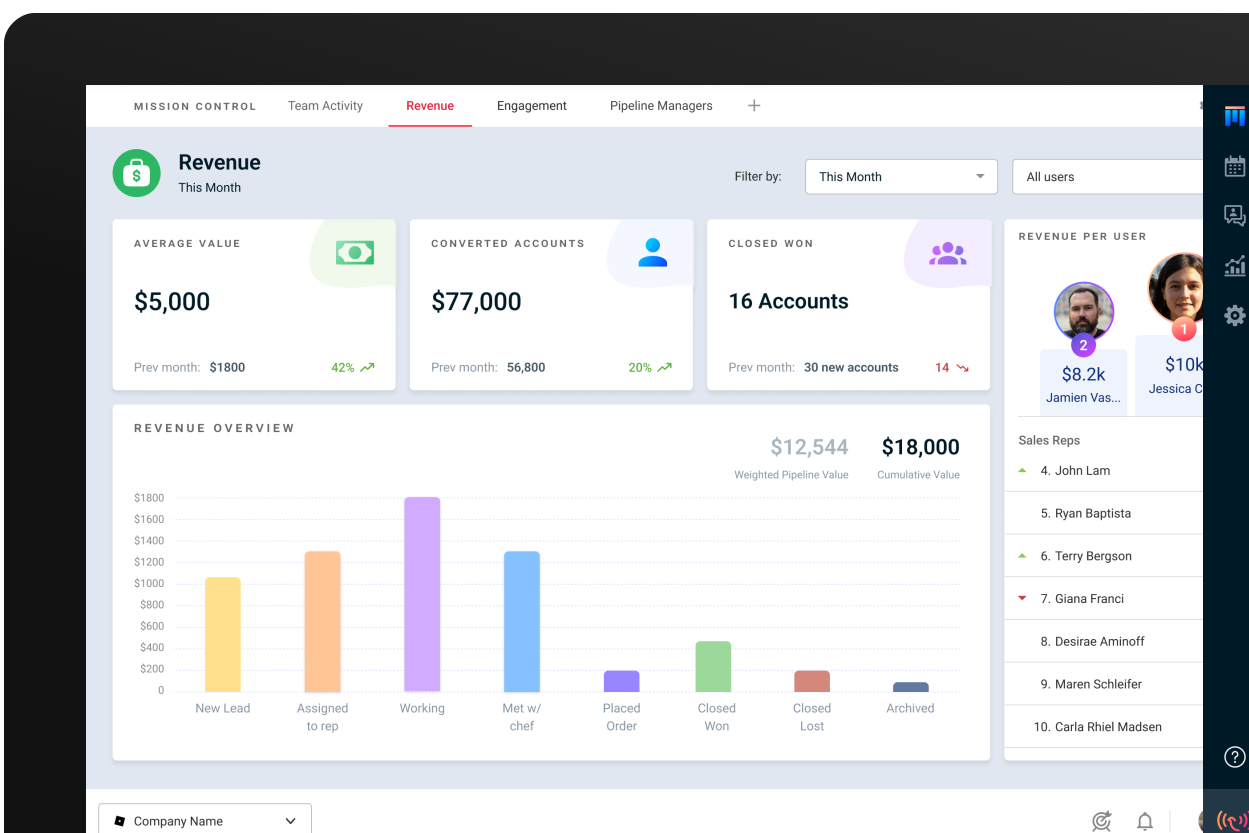
<p>You should be able to name your own stages and switch between pipelines in a click, for example one for new business and another for service tickets or renewals. Wingmate's <a href="https://wingmateapp.com/simple-crm">Simple CRM & Pipeline Management</a> keeps the sales cycle, agreements, and service cycle under one roof.</p>
<h3>2. One-tap lead capture from the field</h3>
<p>The best leads are spotted by the people on site. If capturing one takes more than a photo or a short voice note, it will not happen. <a href="https://wingmateapp.com/reporting-app">In-Field Reporting</a> lets drivers and technicians submit a lead in seconds, and AI can fill fields from a business card or storefront photo.</p>
<h3>3. Mobile and desktop that stay in sync</h3>
<p>Field staff update on the phone; the office follows up from a web dashboard. Real-time updates mean nobody works from stale information.</p>
<h3>4. Documents and e-signature built in</h3>
<p>Quotes, proposals, and service agreements should come from CRM data, not a separate spreadsheet and signature tool. <a href="https://wingmateapp.com/easydocs">EasyDOCs</a> generates them with pricing rules, approvals, and e-signature in the same system.</p>
<h3>5. Maps and territories</h3>
<p>For route-based and local service businesses, seeing customers on a map shows where density is high and where to prospect next. See <a href="https://wingmateapp.com/maps-and-territories">Maps & Territories</a> for how teams plot routes and pin new accounts.</p>
<h3>6. Automated follow-up</h3>
<p>A good CRM sends the right email or text when a deal moves or a customer hits a milestone, so nothing depends on memory. That is the job of <a href="https://wingmateapp.com/marketing-automation">Marketing Automation</a>, and <a href="https://wingmateapp.com/starling-ai">Starling AI</a> can run commands such as "mark every overdue ticket in progress and notify the owners" by voice or text.</p>
<h3>7. Integrations with the tools you already use</h3>
<p>Gmail, Outlook, Zapier, and job tools should connect without double entry. Wingmate covers 8,000+ apps through its <a href="https://wingmateapp.com/integrations">integrations</a>, and Rolodex adds verified contact details inside the CRM; see <a href="https://wingmateapp.com/rolodex">Rolodex</a>.</p>
<!-- CTA banner 1 -->
<div class="cta">
<h3>See a simple CRM your reps will actually open</h3>
<p>Watch how Wingmate brings sales and service into one pipeline, with mobile capture built in.</p>
<a class="btn" href="https://wingmateapp.com/request">Book a Demo</a>
<a class="btn alt" href="https://wingmateapp.com/simple-crm">Explore Simple CRM</a>
</div>
</div>
<!-- TOC 5: How popular simple CRMs compare -->
<div class="wm-article">
<p>Roundups of the best CRMs for service businesses keep naming the same handful of tools. Here is how they differ on what matters to a service team. Prices are published entry points at the time of writing and change often, so confirm on each vendor's site.</p>
<div class="tbl">
<table>
<thead><tr><th>CRM</th><th>Best for</th><th>Typical entry price</th><th>Field / mobile focus</th></tr></thead>
<tbody>
<tr><td><strong>Wingmate</strong></td><td>Field-first sales and service teams (waste, linen, facility, equipment)</td><td>From $89/month, based on products used</td><td>Strong: one-tap capture, rewards, maps</td></tr>
<tr><td>HubSpot CRM</td><td>Teams wanting a free start with marketing tools</td><td>Free core plan</td><td>General-purpose</td></tr>
<tr><td>Less Annoying CRM</td><td>Very small teams that want the bare basics</td><td>About $15/user/month</td><td>Limited</td></tr>
<tr><td>Capsule</td><td>Small professional-services teams</td><td>Free for 2 users, then paid</td><td>General-purpose</td></tr>
<tr><td>monday CRM</td><td>Teams already on monday.com</td><td>About $12/user/month (3-seat minimum)</td><td>General-purpose</td></tr>
<tr><td>Zoho CRM</td><td>Growing teams that want deep customization</td><td>About $14/user/month</td><td>General-purpose</td></tr>
</tbody>
</table>
</div>
<p>The pattern is clear. Most general simple CRMs are built for desk-based sales, so they are easy to learn but treat the field as an afterthought. Wingmate was built by and for the service industry, which is why it focuses on frontline capture, route density, and keeping the sales and service cycles in one pipeline. On <a href="https://wingmateapp.com/pricing">pricing</a>, Wingmate quotes by product bundle rather than per seat, so request a quote to compare it with per-user tools.</p>
<h3>What service teams say</h3>
<p>Proof matters more than promises. A General Linen regional manager reported capturing 9,000 leads in the field and closing 216 of them, and Waste Management reported a driver-engagement lift of over 70%. Read the full <a href="https://wingmateapp.com/customer-stories">customer stories</a>, including <a href="https://wingmateapp.com/customer-stories/service-experts">Service Experts</a> and <a href="https://wingmateapp.com/customer-stories/general-linen">General Linen</a>. On Capterra, Wingmate holds a 4.6 rating from about 100 reviews.</p>
<h3>Industries that benefit most</h3>
<p>A simple, mobile-first CRM pays off fastest where staff meet customers on site: <a href="https://wingmateapp.com/industries/environmental">waste management and site services</a>, <a href="https://wingmateapp.com/industries/linen-and-laundry">commercial laundry and linen</a>, equipment sale and rental, and facility service and maintenance. Browse <a href="https://wingmateapp.com/industries">all industries</a>.</p>
</div>
<!-- TOC 6: A 30-day rollout plan -->
<div class="wm-article">
<p>Basic setup can take just hours, and full adoption usually takes one to two weeks with a simple tool. Use this plan to make it stick.</p>
<ol>
<li><strong>Days 1–3: Map your stages.</strong> Write down the 5–7 steps a lead or ticket really goes through. Keep required fields to the minimum you need to act.</li>
<li><strong>Days 4–7: Import and connect.</strong> Upload contacts from your spreadsheet, connect email and calendar, and set up the mobile app for the field.</li>
<li><strong>Days 8–14: Pilot with one team.</strong> Pick a sales rep, a driver or technician, and one manager. Collect feedback daily.</li>
<li><strong>Days 15–21: Add documents and automation.</strong> Turn on quote templates, e-signature, and automatic follow-up messages.</li>
<li><strong>Days 22–30: Roll out and measure.</strong> Track leads captured, follow-up time, and stalled deals. Recognize the people who log the most useful intel.</li>
</ol>
<p>For a deeper checklist, read our guide on <a href="https://wingmateapp.com/blog/crm-for-sales-teams-how-to-choose-launch-profit-in-2026">how to choose, launch and profit from a CRM</a>, plus <a href="https://wingmateapp.com/blog/3-benefits-of-improving-communication-between-service-and-sales">3 benefits of better communication between service and sales</a> and <a href="https://wingmateapp.com/blog/5-sales-employee-motivation-techniques">5 sales employee motivation techniques</a>. New to pipelines? Start with <a href="https://wingmateapp.com/blog/what-is-a-sales-funnel-a-business-driven-approach-to-customer-acquisition">what is a sales funnel</a>.</p>
</div>
<!-- TOC 7: Common mistakes to avoid -->
<div class="wm-article">
<ul>
<li><strong>Customizing too much too soon.</strong> Start with defaults, then add fields only when someone asks for them.</li>
<li><strong>Ignoring the field.</strong> If drivers and technicians cannot use it on a phone, you lose your best lead source.</li>
<li><strong>Skipping onboarding.</strong> Hands-on training and support, such as Wingmate's in-house team and <a href="https://support.wingmateapp.com/hc/en-us">help center</a>, beat a self-serve manual.</li>
<li><strong>Not measuring adoption.</strong> Check weekly logins and activities, not just closed deals.</li>
</ul>
<!-- CTA banner 2 -->
<div class="cta">
<h3>Ready to simplify your sales and service pipeline?</h3>
<p>Get pricing based on the products you need and a guided setup that takes days, not months.</p>
<a class="btn" href="https://wingmateapp.com/request">Request a Demo</a>
<a class="btn alt" href="https://wingmateapp.com/pricing">View Pricing</a>
</div>
</div>
<!-- TOC 8: Simple CRM for service teams: FAQs -->
<div class="wm-article">
<div class="faq">
<details open><summary>What is a simple CRM for service teams?</summary>
<p>It is customer relationship software that does a few things well: it tracks leads and customers, moves work through a clear pipeline, logs follow-ups, and works from a phone so field and office staff stay in sync, without the setup burden of an enterprise platform.</p></details>
<details><summary>Do service businesses need a CRM?</summary>
<p>Most do once leads, renewals, and service requests are handled by more than one person. If follow-ups slip, notes live in several places, or a spreadsheet has grown to many tabs, a CRM keeps every account and next step in one shared place.</p></details>
<details><summary>What is the easiest CRM to use?</summary>
<p>The easiest CRM is the one your whole team opens every day. For service teams that usually means a mobile-first tool with a short set of fields, a visual pipeline, and one-tap lead capture rather than a feature-heavy suite that needs consultants.</p></details>
<details><summary>Is a CRM better than a spreadsheet?</summary>
<p>A spreadsheet works for one person with a handful of contacts. A CRM is better once several people share data, because it adds reminders, activity history, a pipeline view, documents, and reporting that a spreadsheet cannot provide.</p></details>
<details><summary>How much does a simple CRM cost?</summary>
<p>Published entry prices for simple CRMs commonly run from free plans for very small teams to roughly $12–$15 per user per month. Wingmate starts at $89 per month, with pricing based on the products and team size you need. See <a href="https://wingmateapp.com/pricing">Wingmate pricing</a>.</p></details>
<details><summary>How long does it take to implement a simple CRM?</summary>
<p>Basic setup can take hours, and full team adoption typically takes one to two weeks when the tool is simple and onboarding is hands-on. Complex legacy CRMs can take months.</p></details>
</div>
</div>
<!-- TOC 9: The bottom line -->
<div class="wm-article">
<p>A CRM is only as valuable as the data your team puts into it, and teams put data into tools that are fast and obvious. For service teams, that means a short list of features, a pipeline that mirrors real work, and a mobile app that makes capturing a lead as easy as taking a photo. Less really is more.</p>
<p>Want to see it in action? <a href="https://wingmateapp.com/request"><strong>Book a Wingmate demo</strong></a> or explore the full <a href="https://wingmateapp.com/simple-crm">Simple CRM</a>.</p>
<p class="src"><strong>Sources:</strong> Competitor and pricing context from public roundups by Nutshell, monday.com, Softr, TechnologyAdvice, Alex Berman and Capsule; Wingmate product facts from wingmateapp.com; ratings from Capterra. Verify third-party prices before publishing.</p>
</div>













.svg)