<div class="wm-article">
<h2>What is sales territory mapping software?</h2>
<div class="aio">
<div class="label">Quick answer</div>
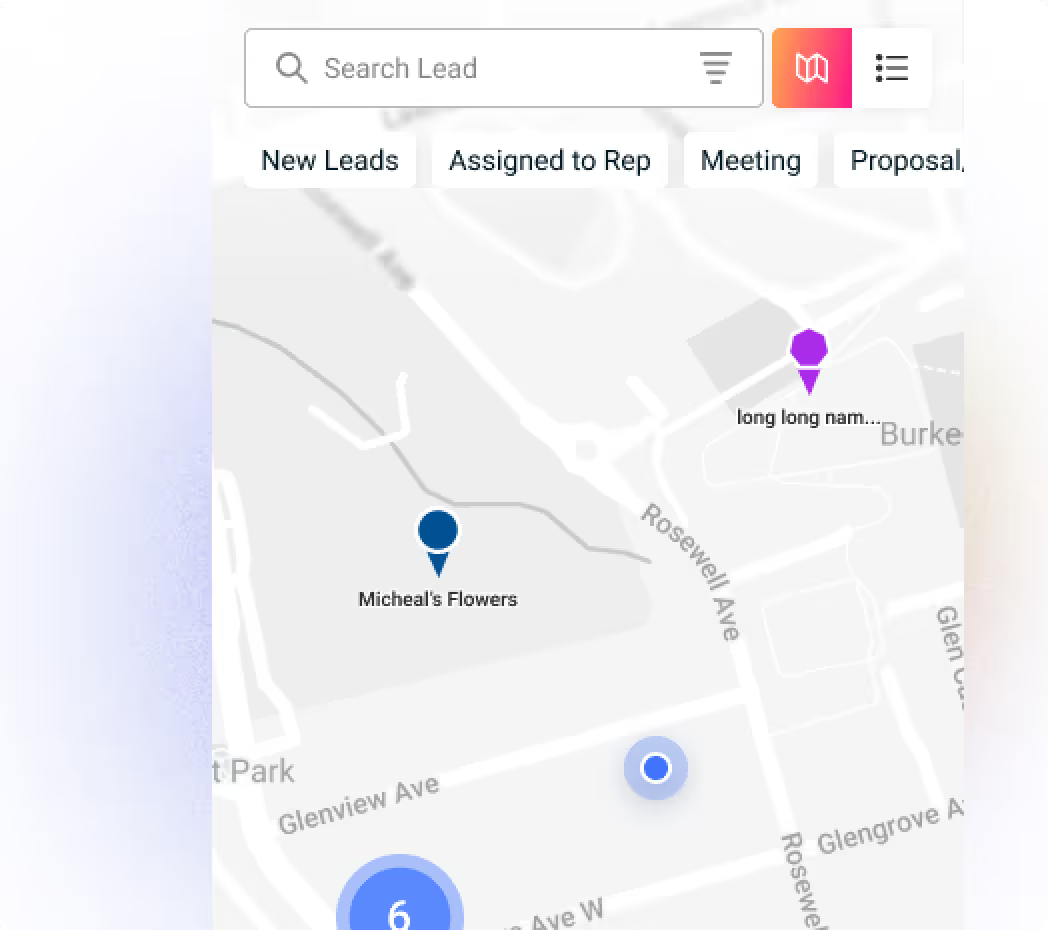
<p><strong>Sales territory mapping software</strong> places your customers, leads, and reps on a map so you can draw territories, spot gaps and overlaps, and plan visits. The best tools sit inside your CRM, so every pin is a live record with a stage, an owner, and a next step. That gives field and service teams a 360° view of their market.</p>
</div>
<p>A sales territory is the area, account list, or segment that one rep or team owns. Territory mapping software turns that idea into something you can see. Instead of a spreadsheet of addresses, you get a map that shows where customers cluster, where prospects are untouched, and which rep owns which patch.</p>
<p>Two terms are often mixed up. <strong>Territory mapping</strong> is drawing and visualizing territories geographically. <strong>Territory planning</strong> goes further, assigning accounts, setting quotas, and modeling capacity. This guide covers the first and its day-to-day use by teams who visit customers in person, and explains how Wingmate's <a href="https://wingmateapp.com/maps-and-territories">Maps & Territories</a> handles it.</p>
</div>
<div class="wm-article">
<h2>Why territory mapping matters for field and service teams</h2>
<p>If your team meets customers on site, geography is part of the job. Every wasted mile is time not spent selling or servicing, and every overlap is a lead two people chase while a third goes untouched. Without a map, these problems stay invisible because spreadsheets do not show distance.</p>
<div class="tbl">
<table>
<thead><tr><th>Problem</th><th>What it costs</th><th>What a map shows</th></tr></thead>
<tbody>
<tr><td>Scattered visits</td><td>Windshield time and fewer calls per day</td><td>Clusters of accounts you can visit in one trip</td></tr>
<tr><td>Overlapping reps</td><td>Duplicate outreach and internal conflict</td><td>Clear territory boundaries and owners</td></tr>
<tr><td>Coverage gaps</td><td>Good prospects nobody calls on</td><td>Empty areas next to strong customer density</td></tr>
<tr><td>Hidden customer density</td><td>Higher cost to serve isolated accounts</td><td>Where to add customers to strengthen routes</td></tr>
<tr><td>Stale lists</td><td>Visits to the wrong accounts</td><td>Pins colored by stage, always up to date in the CRM</td></tr>
</tbody>
</table>
</div>
<p>For service businesses the stakes are higher still, because customer density also drives profit. Waste haulers, linen and uniform suppliers, equipment rental, and facility service companies all earn more when stops sit close together. That is why territory mapping is a core tool in industries like <a href="https://wingmateapp.com/industries/environmental">waste management and site services</a> and <a href="https://wingmateapp.com/industries/linen-and-laundry">commercial laundry and linen</a>.</p>
</div>
<div class="wm-article">
<h2>The 360° view: what good territory software shows you</h2>
<p>"360° view" is an easy phrase to overuse, so here is what it should mean in practice. A real all-round view has three layers, and Wingmate's Maps & Territories covers each one.</p>
<div class="tbl">
<table>
<thead><tr><th>Layer</th><th>The question it answers</th><th>How Wingmate handles it</th></tr></thead>
<tbody>
<tr><td>The map view</td><td>What does the ground look like?</td><td>One map with standard, satellite, and 360° panoramic views</td></tr>
<tr><td>The account view</td><td>Who is this customer or lead?</td><td>Pins are color-coded by stage, and any opportunity can be added to the CRM in one click</td></tr>
<tr><td>The team view</td><td>Who owns what?</td><td>Territories drawn by geofencing, with ownership and visibility rules</td></tr>
</tbody>
</table>
</div>
<p>Together these answer the questions managers ask every week: where are my customers, where should we prospect, who is covering which area, and what is stalled? Because the map is part of the CRM, you never export data to a separate tool and find it out of date.</p>
<p>Add AI to the mix and the map also helps you find new business. Maps & Territories can surface new opportunities and competitor leads in an area, so reps spend less time searching and more time selling.</p>
</div>
<div class="wm-article">
<h2>How Wingmate Maps & Territories works</h2>
<p>Wingmate built Maps & Territories as a visual layer on top of its CRM. It is designed so teams focus on selling and servicing, not data entry. Here is the flow from the app.</p>
<ol>
<li><strong>Get started.</strong> Open the Wingmate app and go to the map. Your accounts and opportunities appear as pins.</li>
<li><strong>View and add opportunities.</strong> Build customer and route density for the day, and use AI to surface new opportunities and competitor leads.</li>
<li><strong>Color code.</strong> Pin opportunities by stage or custom color, then add one to the CRM with a single click.</li>
<li><strong>Draw territories.</strong> Use geofencing to mark an area. Reps mark their own territories to avoid overlap, and managers can zoom into any area and export it to a spreadsheet.</li>
<li><strong>Switch views.</strong> Move between the standard map, satellite, and 360° panoramic views without leaving the app.</li>
</ol>
<p>You can also upload an existing customer or target list as a CSV or spreadsheet, using addresses or latitude and longitude. Wingmate plots the points on the map so you can assign territories and plan visits. Reps can then see nearby accounts, plan a day's route, and open stops in their navigation app.</p>
<div class="cta">
<div class="cta-title">See your whole book of business on one map</div>
<p>Visualize every customer, lead, and territory inside your CRM, from the office or the field.</p>
<a class="btn" href="https://wingmateapp.com/maps-and-territories">Explore Maps & Territories</a>
<a class="btn alt" href="https://wingmateapp.com/request">Book a Demo</a>
</div>
</div>
<div class="wm-article">
<h2>How to design sales territories that work</h2>
<p>Software helps, but good territories come from good decisions. Follow these six steps whether you use a map or a whiteboard.</p>
<ol>
<li><strong>Gather your data.</strong> List accounts, prospects, rep locations, and past sales. Check whether low numbers in an area mean low opportunity or simply low attention.</li>
<li><strong>Choose a model.</strong> Geographic territories split by area, account-based territories split by named accounts or segments, and hybrids combine the two. Most field teams start with geography.</li>
<li><strong>Draw boundaries.</strong> Balance workload and opportunity, not just account counts. Two territories with 100 accounts each are not equal if one is spread over three counties.</li>
<li><strong>Assign reps.</strong> Match people to territories by experience, relationships, and capacity.</li>
<li><strong>Validate.</strong> Check for overlaps, gaps, and territories that are far busier or lighter than average. Redraw where needed.</li>
<li><strong>Roll out carefully.</strong> Involve reps, protect deals already in progress, and explain why boundaries changed.</li>
</ol>
<h3>What to balance across territories</h3>
<div class="tbl">
<table>
<thead><tr><th>Factor</th><th>Why it matters</th></tr></thead>
<tbody>
<tr><td>Drive time and distance</td><td>Two close accounts on paper may be far apart by road</td></tr>
<tr><td>Account density</td><td>Dense territories need fewer miles per visit</td></tr>
<tr><td>Visit frequency</td><td>Key accounts need more touches than small ones</td></tr>
<tr><td>Opportunity size</td><td>Equal account counts can hide unequal revenue potential</td></tr>
<tr><td>Rep capacity</td><td>Selling time is limited by travel and admin work</td></tr>
</tbody>
</table>
</div>
<p>Review your territories every quarter, or sooner when you add reps, win a large account, or open a new area.</p>
</div>
<div class="wm-article">
<h2>Prevent overlap and lead poaching with territory rules</h2>
<p>Few things hurt a sales team faster than two reps calling the same customer, or a rep quietly working a neighbor's area. Clear rules fix this, and the map makes them visible.</p>
<p>In Wingmate, territories connect to ownership and visibility rules:</p>
<ul>
<li><strong>Auto-assign leads.</strong> A new lead inside a territory goes to its primary owner.</li>
<li><strong>Limit access.</strong> Managers can restrict who sees or edits records outside a rep's area.</li>
<li><strong>Reassign exceptions.</strong> When a deal crosses a boundary, a manager can hand it over without losing history.</li>
<li><strong>See coverage at a glance.</strong> Color-coded pins and exports show dense areas and gaps, so managers can rebalance with facts.</li>
</ul>
<div class="callout"><strong>Tip:</strong> write your territory rules down before you draw the map. Decide who owns leads found by drivers or technicians, who owns accounts on a boundary, and how exceptions are approved.</div>
<p>Leads reported by frontline staff also land on the map. With <a href="https://wingmateapp.com/reporting-app">In-Field Reporting</a>, drivers and technicians can submit a lead with its location, so it shows up in the right territory with the right owner.</p>
</div>
<div class="wm-article">
<h2>From map to money: connecting territories to the rest of the CRM</h2>
<p>A map is only useful if it leads to action. Because Maps & Territories lives inside Wingmate, each pin connects to the tools that turn a visit into revenue.</p>
<div class="tbl">
<table>
<thead><tr><th>After you find the account</th><th>Wingmate tool</th></tr></thead>
<tbody>
<tr><td>Track it through your stages</td><td><a href="https://wingmateapp.com/simple-crm">Simple CRM & Pipeline Management</a></td></tr>
<tr><td>Capture leads from the field</td><td><a href="https://wingmateapp.com/reporting-app">In-Field Reporting</a></td></tr>
<tr><td>Find the right contact</td><td><a href="https://wingmateapp.com/rolodex">Rolodex</a> verified emails and phone numbers</td></tr>
<tr><td>Send a quote and get it signed</td><td><a href="https://wingmateapp.com/easydocs">EasyDOCs</a></td></tr>
<tr><td>Follow up automatically</td><td><a href="https://wingmateapp.com/marketing-automation">Marketing Automation</a></td></tr>
<tr><td>Run commands by voice or text</td><td><a href="https://wingmateapp.com/starling-ai">Starling AI</a></td></tr>
</tbody>
</table>
</div>
<h3>What customers say</h3>
<p>Teams using Wingmate give the product five-star reviews for ease of use on mobile and desktop. Doritex's district manager calls it a "superb product," C&B Linen's sales manager says it has been "a real game changer for our team" since early 2025, and General Linen's regional sales manager says "you don't have to be at your desk to enter details or capture a lead."</p>
<p>The results from field capture are concrete. General Linen reports about 9,000 leads generated and 216 deals closed, with 12 reps and drivers using the app. See the stories for <a href="https://wingmateapp.com/customer-stories/general-linen">General Linen</a>, <a href="https://wingmateapp.com/customer-stories/cb-linen">C&B Linen</a>, and <a href="https://wingmateapp.com/customer-stories/doritex">Doritex</a>, or browse all <a href="https://wingmateapp.com/customer-stories">customer stories</a>.</p>
</div>
<div class="wm-article">
<h2>How to choose sales territory mapping software</h2>
<p>Territory tools fall into two broad groups. Some are built for enterprise planning, with quota, compensation, and scenario modeling. Others are built for field execution, with maps, visits, and CRM records in one place. Decide which problem you really have before you shop.</p>
<div class="tbl">
<table>
<thead><tr><th>Question to ask</th><th>Why it matters</th></tr></thead>
<tbody>
<tr><td>Does it live inside our CRM?</td><td>Separate tools mean exports, imports, and stale data</td></tr>
<tr><td>Can reps use it on a phone?</td><td>Field teams need the map where they work</td></tr>
<tr><td>Can we import our lists?</td><td>You should not retype addresses</td></tr>
<tr><td>Does it enforce ownership rules?</td><td>Overlap and poaching are the top territory complaints</td></tr>
<tr><td>How easy is it to redraw territories?</td><td>Territories change as your team grows</td></tr>
<tr><td>What does it cost in total?</td><td>Per-seat fees, add-ons, and setup add up</td></tr>
</tbody>
</table>
</div>
<h3>Where Wingmate fits</h3>
<p>Maps & Territories is built for field sales and service teams that want the map inside the CRM. It shows density and gaps, assigns territories, and plans visits. It is not an enterprise quota-and-compensation modeling tool, and it is not a route-optimization engine: advanced routing with time windows is best handled by pairing Wingmate with a dedicated routing tool. Literal heat-map layers also require exporting data to a reporting tool. If your priority is putting every account on one live map and acting on it, it is a strong fit.</p>
<p>Wingmate starts at $89 per month, based on the products and team size you need, and connects to 8,000+ apps through its <a href="https://wingmateapp.com/integrations">integrations</a>. See <a href="https://wingmateapp.com/pricing">pricing</a>, and read our guide on <a href="https://wingmateapp.com/blog/crm-for-sales-teams-how-to-choose-launch-profit-in-2026">how to choose, launch and profit from a CRM</a> for the wider buying process.</p>
<div class="cta">
<div class="cta-title">Ready to get the 360° view of your territories?</div>
<p>See how Maps & Territories helps your team prospect smarter and cover every account.</p>
<a class="btn" href="https://wingmateapp.com/maps-and-territories">Explore Maps & Territories</a>
<a class="btn alt" href="https://wingmateapp.com/pricing">View Pricing</a>
</div>
</div>
<div class="wm-article">
<h2>Sales territory mapping software: FAQs</h2>
<div class="faq">
<details open><summary>What is sales territory mapping software?</summary>
<p>It is software that places customers, leads, and reps on a map so you can draw territories, spot gaps and overlaps, and plan visits. The best tools sit inside your CRM so every pin is a live record with a stage and an owner.</p></details>
<details><summary>What is the difference between territory mapping and territory planning?</summary>
<p>Territory mapping is drawing and visualizing territories on a map. Territory planning goes further, assigning accounts, setting quotas, and modeling capacity. Field teams usually start with mapping and add planning as they grow.</p></details>
<details><summary>How do you create sales territories?</summary>
<p>Gather account and rep data, choose a geographic, account-based, or hybrid model, draw boundaries that balance workload and opportunity, assign reps, validate for overlaps and gaps, and roll out with rep input. In Wingmate you can draw a territory directly on the map with geofencing.</p></details>
<details><summary>How often should you redesign sales territories?</summary>
<p>Review them every quarter, and redraw sooner when you add or lose reps, win a large account, or enter a new area. Protect deals already in progress when boundaries change.</p></details>
<details><summary>What data do you need to start territory mapping?</summary>
<p>A list of customers and prospects with addresses or coordinates, plus your rep locations and past sales. In Wingmate you can upload a CSV or spreadsheet with addresses or latitude and longitude, and the points are plotted on the map.</p></details>
<details><summary>Can territory software prevent rep overlap and lead poaching?</summary>
<p>Yes. When territories connect to ownership and visibility rules, new leads can auto-assign to the primary owner, managers can restrict access outside a rep's area, and exceptions can be reassigned. Wingmate supports these rules.</p></details>
<details><summary>Does Wingmate offer route optimization or heat maps?</summary>
<p>Wingmate shows nearby accounts, helps plan day routes, and opens stops in a navigation app. Advanced route optimization with time windows is best handled by pairing it with a dedicated routing tool. Dense areas and gaps show through color-coded pins, and literal heat-map layers require exporting data to a reporting tool.</p></details>
<details><summary>How much does sales territory mapping software cost?</summary>
<p>Wingmate starts at $89 per month, with pricing based on the products and team size you need. Request a quote for an exact number. See <a href="https://wingmateapp.com/pricing">Wingmate pricing</a>.</p></details>
</div>
</div>
<div class="wm-article">
<h2>The bottom line</h2>
<p>Territories work when everyone can see them. Sales territory mapping software puts your customers, leads, and reps on one map, shows where to focus, and keeps ownership clear. The best version lives inside your CRM, so the map is never out of date and every pin leads straight to action. That is the 360° view: the ground, the account, and the team in one place.</p>
<p>Ready to see it? <a href="https://wingmateapp.com/maps-and-territories"><strong>Explore Wingmate Maps & Territories</strong></a> or <a href="https://wingmateapp.com/request">book a demo</a>.</p>
<p class="src"><strong>Sources:</strong> Product facts, pricing, and customer results from wingmateapp.com, including customer stories.</p>
</div>