<div class="wm-article">
<h2>What is sales pipeline management software?</h2>
<div class="aio">
<div class="label">Quick answer</div>
<p><strong>Sales pipeline management software</strong> tracks every lead and deal through your sales stages, from first contact to closed deal. It shows what is stalled, what needs a follow-up, and how much revenue is likely to close. The best tools stay simple, work on a phone, and connect sales and service so nothing is lost between handoffs.</p>
</div>
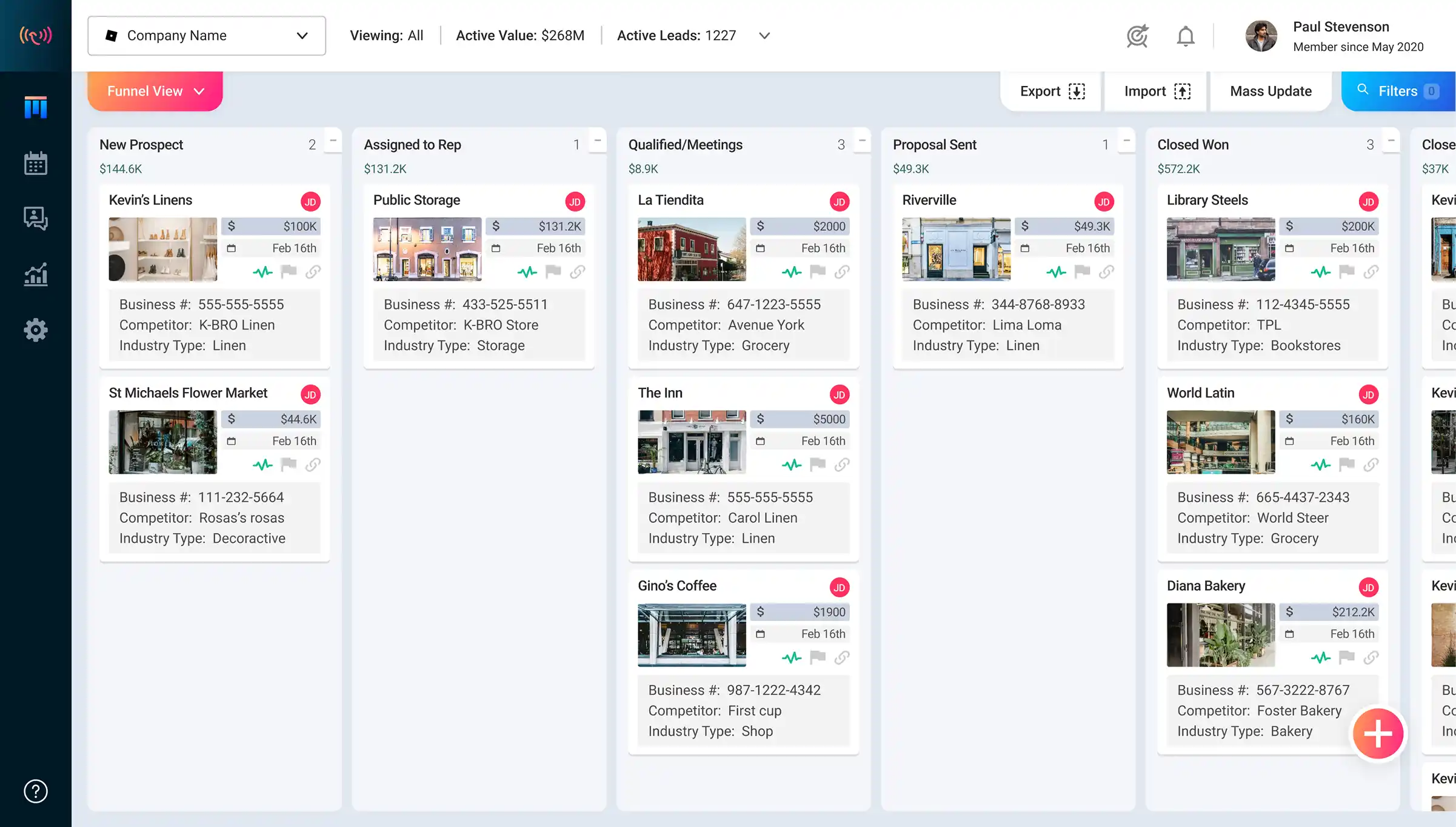
<p>Sales pipeline management software is a tool that tracks every lead and deal as it moves through your sales process. Instead of a spreadsheet or a rep's memory, you get a visual board: each column is a stage, each card is a deal, and each deal shows its value, owner, and next step.</p>
<p>It is closely related to a CRM, which stores customer and contact records. Wingmate's <a href="https://wingmateapp.com/simple-crm">Simple CRM</a> combines both, so contact history and deal progress stay in one place.</p>
<h3>Pipeline vs. funnel: what is the difference?</h3>
<p>A <strong>sales pipeline</strong> is a working view of the specific deals your team is chasing and which stage each one is in. A <strong>sales funnel</strong> is a model of how a large pool of prospects narrows as it moves toward purchase. The pipeline tells you what to do today; the funnel tells you how well your process converts. For the funnel side, read <a href="https://wingmateapp.com/blog/what-is-a-sales-funnel-a-business-driven-approach-to-customer-acquisition">what is a sales funnel</a>.</p>
<h3>Why teams invest in pipeline management</h3>
<ul>
<li><strong>Better forecasts.</strong> Stage and value data shows what is likely to close this month and next.</li>
<li><strong>Fewer stalled deals.</strong> Deals that sit too long in one stage get flagged before they go cold.</li>
<li><strong>Clear accountability.</strong> Every deal has an owner and a next step.</li>
<li><strong>Faster handoffs.</strong> When a deal closes, delivery and service see the same record.</li>
</ul>
</div>
<div class="wm-article">
<h2>7 sales pipeline stages and the metrics to track</h2>
<p>Stages differ by team and industry, so treat this as a starting point. What matters is defining clear exit criteria for each stage, so a deal only moves forward when something real has happened.</p>
<div class="tbl">
<table>
<thead><tr><th>#</th><th>Stage</th><th>Exit criteria</th><th>Metric to track</th></tr></thead>
<tbody>
<tr><td>1</td><td>Lead generation</td><td>Contact captured with source</td><td>Leads per source, cost per lead</td></tr>
<tr><td>2</td><td>Qualification</td><td>Need, budget, and decision-maker confirmed</td><td>Qualification rate</td></tr>
<tr><td>3</td><td>Meeting or call</td><td>Discovery done, next step booked</td><td>Meeting conversion rate</td></tr>
<tr><td>4</td><td>Proposal or quote</td><td>Quote sent and opened</td><td>Proposal acceptance rate</td></tr>
<tr><td>5</td><td>Negotiation</td><td>Terms agreed in principle</td><td>Time in negotiation</td></tr>
<tr><td>6</td><td>Closing</td><td>Agreement signed</td><td>Win rate, sales cycle length</td></tr>
<tr><td>7</td><td>Post-sale follow-up</td><td>Onboarding or service started</td><td>Retention, upsell and referral rate</td></tr>
</tbody>
</table>
</div>
<h3>The three formulas worth knowing</h3>
<p>You do not need a dozen dashboards. These three numbers tell you most of what you need:</p>
<div class="formula">Win rate = deals won ÷ (deals won + deals lost) × 100<br>
Pipeline coverage = total open pipeline value ÷ sales target for the period<br>
Pipeline velocity = (open deals × average deal value × win rate) ÷ average sales cycle in days</div>
<p>For example, 40 open deals averaging $4,000 with a 25% win rate and a 50-day cycle gives a velocity of 40 × $4,000 × 0.25 ÷ 50 = <strong>$800 of revenue per day</strong>. Raise any of the first three inputs, or shorten the cycle, and velocity goes up.</p>
<div class="callout"><strong>Tip:</strong> Most teams fix velocity by shortening the cycle, not by chasing more leads. Faster follow-up and documents sent from the CRM usually move the number more than extra prospecting.</div>
</div>
<div class="wm-article">
<h2>Features to look for in sales pipeline management software</h2>
<p>Review sites list dozens of features, but a handful decide whether the tool gets used. Use this table as your checklist.</p>
<div class="tbl">
<table>
<thead><tr><th>Feature</th><th>Why it matters</th><th>How Wingmate handles it</th></tr></thead>
<tbody>
<tr><td>Visual, customizable pipeline</td><td>Stages must match how you actually sell</td><td>Your own stages and fields, with multiple pipelines for sales, service, and renewals; see <a href="https://wingmateapp.com/simple-crm">Simple CRM</a></td></tr>
<tr><td>Mobile capture</td><td>Deals are updated in the moment, not days later</td><td>Photo and voice lead capture with <a href="https://wingmateapp.com/reporting-app">In-Field Reporting</a></td></tr>
<tr><td>Quotes and e-signature</td><td>Documents are where deals stall</td><td>Quotes, proposals, and agreements built in with <a href="https://wingmateapp.com/easydocs">EasyDOCs</a></td></tr>
<tr><td>Automation and reminders</td><td>Follow-up cannot depend on memory</td><td><a href="https://wingmateapp.com/marketing-automation">Marketing Automation</a> and task reminders</td></tr>
<tr><td>Reporting and forecasts</td><td>Managers need to see stalled and closing deals</td><td>Real-time reporting and <a href="https://wingmateapp.com/starling-ai">Starling AI</a> pipeline summaries</td></tr>
<tr><td>Integrations</td><td>No double entry between email and CRM</td><td>8,000+ apps through <a href="https://wingmateapp.com/integrations">integrations</a></td></tr>
<tr><td>Contact data</td><td>Reps should not hunt for emails and phone numbers</td><td>Verified contacts inside the CRM with <a href="https://wingmateapp.com/rolodex">Rolodex</a></td></tr>
</tbody>
</table>
</div>
</div>
<div class="wm-article">
<h2>Pipeline management for field and service teams</h2>
<p>A service business works differently from a desk-based sales team. Drivers, technicians, and account managers spot opportunities on site, and the "sale" does not end at signature: renewals, tickets, and upsells keep the account moving through a second, service-side pipeline.</p>
<p>That is why a service team needs more than one pipeline in the same system: one for new business, one for service requests or work orders, and one for renewals. When they live in separate tools, handoffs break and nobody sees the whole account. Wingmate was built for this, and it adds <a href="https://wingmateapp.com/maps-and-territories">Maps & Territories</a> so teams can plot customers, see route density, and prospect nearby accounts.</p>
<p>The results show up in the numbers customers report. A General Linen regional manager described capturing 9,000 leads in the field and closing 216, and Waste Management reported a driver-engagement lift of over 70%. Read more in the <a href="https://wingmateapp.com/customer-stories">customer stories</a>, or see how it fits <a href="https://wingmateapp.com/industries/environmental">waste management</a>, <a href="https://wingmateapp.com/industries/linen-and-laundry">commercial laundry and linen</a>, and <a href="https://wingmateapp.com/industries">other industries</a>.</p>
<div class="cta">
<div class="cta-title">See your sales and service pipelines in one place</div>
<p>Book a short demo and watch how Wingmate tracks deals from the field to the office.</p>
<a class="btn" href="https://wingmateapp.com/request">Book a Demo</a>
<a class="btn alt" href="https://wingmateapp.com/simple-crm">Explore Simple CRM</a>
</div>
</div>
<div class="wm-article">
<h2>How Wingmate manages your sales pipeline</h2>
<p>Wingmate's <a href="https://wingmateapp.com/simple-crm">Simple CRM & Pipeline Management</a> brings your sales cycle, agreements, and service cycle into one place, tailored to your own stages and fields. Reps update it from the field, and managers see the same deals in real time on the web dashboard.</p>
<div class="tbl">
<table>
<thead><tr><th>What you get</th><th>With Wingmate</th></tr></thead>
<tbody>
<tr><td>Setup</td><td>Live in days, not months, with onboarding, data migration, and integrations handled in-house</td></tr>
<tr><td>Pricing</td><td>From $89/month, quoted by the products and team size you need; see <a href="https://wingmateapp.com/pricing">pricing</a></td></tr>
<tr><td>Mobile</td><td>iOS and Android apps so field staff can capture and update from the job site</td></tr>
<tr><td>Integrations</td><td>8,000+ apps, including Gmail, Outlook, Zapier, and Jobber; see <a href="https://wingmateapp.com/integrations">integrations</a></td></tr>
<tr><td>Support</td><td>In-house support plus Concierge Club access to webinars and unlimited training</td></tr>
<tr><td>Track record</td><td>1,000+ businesses in 120+ countries and a 4.6 rating from about 100 reviews on Capterra</td></tr>
</tbody>
</table>
</div>
<p>Pricing follows the products you use rather than a long list of seats and add-ons, so <a href="https://wingmateapp.com/request">request a quote</a> to get an exact number for your team.</p>
</div>
<div class="wm-article">
<h2>How to choose and roll out your pipeline software</h2>
<h3>A six-question buying checklist</h3>
<ol>
<li><strong>Who updates the pipeline?</strong> If it is people in the field, mobile capture is non-negotiable.</li>
<li><strong>Can it hold more than one pipeline?</strong> Sales, service, and renewals should share one system.</li>
<li><strong>Do documents live inside it?</strong> Quotes and e-signature shorten the sales cycle.</li>
<li><strong>How long does setup take?</strong> Ask for a realistic timeline for your team size, and who does the work.</li>
<li><strong>What does it connect to?</strong> Email, calendar, and the job tools you already use.</li>
<li><strong>What does it really cost?</strong> Include add-ons, extra pipelines, and any consultants.</li>
</ol>
<h3>Five best practices once you go live</h3>
<ul>
<li><strong>Keep data clean.</strong> Remove duplicates and close out dead deals monthly.</li>
<li><strong>Standardize stages.</strong> Use written exit criteria so every rep moves deals the same way.</li>
<li><strong>Review weekly.</strong> Spend 30 minutes on stalled and closing deals, not status updates.</li>
<li><strong>Automate follow-up.</strong> Let the system send reminders, emails, and texts when a deal moves.</li>
<li><strong>Reward good data.</strong> Recognize the people who log useful intel, as in our post on <a href="https://wingmateapp.com/blog/5-sales-employee-motivation-techniques">sales employee motivation</a>.</li>
</ul>
<h3>Common pipeline problems and fixes</h3>
<div class="tbl">
<table>
<thead><tr><th>Problem</th><th>Why it happens</th><th>Fix</th></tr></thead>
<tbody>
<tr><td>Stalled deals</td><td>No next step or owner</td><td>Require a next step; flag deals idle past a set number of days</td></tr>
<tr><td>Inaccurate forecasts</td><td>Stale data and vague stages</td><td>Use exit criteria and update from the field in real time</td></tr>
<tr><td>Low adoption</td><td>Tool is slow or desktop-only</td><td>Choose a mobile-first tool and train with real deals</td></tr>
<tr><td>Lost handoffs</td><td>Sales and service use different tools</td><td>Run both pipelines in one system</td></tr>
</tbody>
</table>
</div>
<p>For a wider checklist, see <a href="https://wingmateapp.com/blog/crm-for-sales-teams-how-to-choose-launch-profit-in-2026">how to choose, launch and profit from a CRM</a> and <a href="https://wingmateapp.com/blog/7-ways-to-optimize-your-sales-performance">7 ways to optimize your sales performance</a>. Teams that want help filling the top of the pipeline can look at Wingmate's invite-only <a href="https://wingmateapp.com/outsourced-sales-team">Inside Sales</a> service.</p>
<div class="cta">
<div class="cta-title">Ready to simplify your pipeline?</div>
<p>Get pricing based on the products you need and a guided setup that takes days, not months.</p>
<a class="btn" href="https://wingmateapp.com/request">Request a Demo</a>
<a class="btn alt" href="https://wingmateapp.com/pricing">View Pricing</a>
</div>
</div>
<div class="wm-article">
<h2>Sales pipeline management software: FAQs</h2>
<div class="faq">
<details open><summary>What is sales pipeline management software?</summary>
<p>It is a tool that tracks every lead and deal as it moves through your sales stages, from first contact to closed deal. It shows what is in each stage, what is stalled, what needs a follow-up, and how much revenue is likely to close, so teams can act instead of guess.</p></details>
<details><summary>What is the difference between a CRM and sales pipeline management software?</summary>
<p>A CRM stores customer and contact records and their history. Pipeline management software focuses on the movement of deals through stages. Most modern CRMs include pipeline management, and the best ones combine both so contact data and deal progress live in one place.</p></details>
<details><summary>What is the difference between a sales pipeline and a sales funnel?</summary>
<p>A sales pipeline tracks the specific deals your team is working and the stage each one is in. A sales funnel describes how the overall pool of prospects narrows from awareness to purchase. The pipeline is a working view of deals; the funnel is a model of conversion.</p></details>
<details><summary>What are the stages of a sales pipeline?</summary>
<p>A common pipeline has seven stages: lead generation, qualification, meeting or call, proposal or quote, negotiation, closing, and post-sale follow-up. Stages vary by team and industry, so define clear exit criteria for each one.</p></details>
<details><summary>How often should you update your sales pipeline?</summary>
<p>Reps should update deals as activity happens, ideally from a phone right after a visit or call, and managers should review the pipeline weekly. Stale data is the main reason pipeline reports stop being trusted.</p></details>
<details><summary>How much does sales pipeline management software cost?</summary>
<p>Wingmate starts at $89 per month, with pricing based on the products and team size you need. Because every team uses a different mix of pipelines, documents, mapping, and automation, the best way to get an exact number is to request a quote. See <a href="https://wingmateapp.com/pricing">Wingmate pricing</a>.</p></details>
</div>
</div>
<div class="wm-article">
<h2>The bottom line</h2>
<p>The right sales pipeline management software is the one your team keeps current. Look for a pipeline that matches how you sell, mobile capture for the people in the field, documents and follow-ups built in, and one place for both sales and service. Get those right and forecasts, handoffs, and win rates take care of themselves.</p>
<p>Want to see it in action? <a href="https://wingmateapp.com/request"><strong>Book a Wingmate demo</strong></a> or explore the full <a href="https://wingmateapp.com/simple-crm">Simple CRM</a>.</p>
<p class="src"><strong>Sources:</strong> Product facts, pricing, and customer results from wingmateapp.com; formulas are standard industry definitions.</p>
</div>














.svg)